Last week I was on a call with a paving company.
Good business. Busy crews. Driveways going in every week.
They’d started running Google Ads. About £230 had gone out of the account.
So I asked the obvious question. What did that £230 get you?
Nobody knew.
Not because anyone was hiding anything. Because nothing was set up to tell them. There was no conversion tracking on Google Ads. There was no Meta pixel on the website either.
The money had been spent. The ads had run. And there was no way of knowing if a single phone call came from them.
I see this more than you’d think. So here’s what that actually costs you, what Google itself now says it needs, and how to check your own account in about ten minutes.
What “no tracking” actually means
Conversion tracking is how Google knows an ad did its job.
Someone searches “block paving near me”. They click your ad. They ring you, or fill in your form. Tracking is the bit that tells Google: that click turned into an enquiry.
Without it, Google only sees clicks.
And clicks are not jobs. A click can be a homeowner who wants a quote. It can also be someone looking for a picture of a patio, a student, or a competitor having a nosy.
If Google can’t tell the difference, it can’t send you more of the good ones.
Why it costs you more than £230
The £230 is the small bit.
The bigger cost is what happens next.
You can’t tell if it’s working. You might have had three driveways from that spend. You might have had none. Either way, you’re guessing whether to carry on.
Google can’t learn. Most Google Ads campaigns now use automated bidding. Google decides how much to bid for each search. It makes those decisions based on which clicks turned into enquiries. No tracking means no lessons. It’s bidding blind with your money.
You can’t compare. Is Google cheaper than Facebook for you? Is Checkatrade cheaper than both? Without numbers on each, you’ll never know which one to put more into.
You can’t hold anyone to account. If someone else runs your ads, tracking is how you check their work. A monthly report full of clicks and impressions tells you nothing about your diary.
Clicks don’t pay wages. Enquiries do. Jobs do even more.
Google now puts a number on it: 15 enquiries a month
This is the part I wanted to add, because Google has just made the point for me.
Google’s help page for troubleshooting Performance Max campaigns has been updated. It now says a campaign needs at least 15 conversions over 30 days for stable performance.
In plain English: about 15 tracked enquiries a month before Google settles down.
Performance Max is the campaign type that shows your ads across Google Search, Maps, YouTube and other websites all at once. A lot of trade businesses get pushed onto it because Google recommends it.
Here’s the problem.
If you have no tracking, you have zero conversions. Google has nothing to learn from.
If your tracking only counts form fills, and most of your customers ring you, you might only see four or five a month. Google still doesn’t have enough.
Either way, the campaign stays jumpy. Spend goes up and down. Results go up and down. And it’s easy to blame the ads when the real problem is that Google can’t see what’s working.
To be fair to Google, the page doesn’t say what happens if you’re under 15. It doesn’t say your ads stop. It just says you won’t get stable results. That’s guidance, not a rule. But it’s useful guidance, because it’s Google saying it out loud.
What I do if a trade business is under 15 a month
Count every real enquiry. Calls from the ad, calls from the website, form fills, quote requests. If you only count one of those, you’re undercounting.
Use Search campaigns instead. For most local trades with a smaller budget, I’d rather run a well built Search campaign. You choose the searches you show up for. You can see exactly what people typed. It doesn’t need as much data to behave.
Don’t just throw more budget at it. More money into a campaign Google can’t learn from is just more money it can’t learn from.
Why winter is the time to fix this
If you lay driveways, patios or do landscaping, you already know how this goes.
Homeowners don’t book a new driveway in a downpour in November. But they do start thinking about it. They browse in winter. They get quotes in January and February. They want the work done by spring and summer.
That paving company I spoke to told me the same thing. Winter is when their customers plan.
So winter is when your tracking needs to be right. If it’s set up now, Google has a few months of real enquiry data before the busy season. If you wait until March, you’ll be paying for Google to learn at exactly the moment you want it firing on all cylinders.
I wrote more about this in my October plan for a busy January.
How to check your own Google Ads tracking in 10 minutes
You don’t need to be technical for this. You just need your Google Ads login.
Step 1: Open your conversions
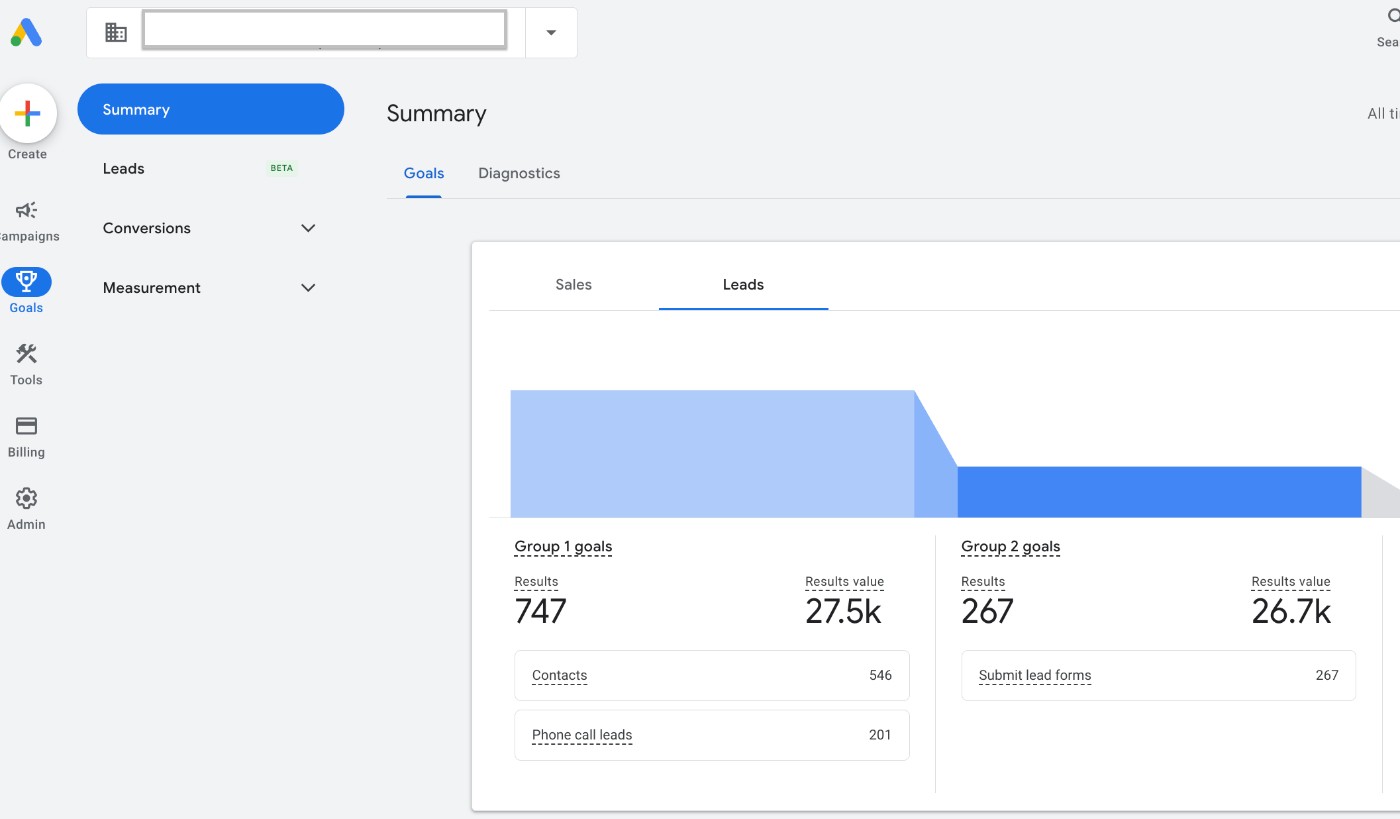
Log into Google Ads. Click Goals in the left hand menu, then Conversions, then Summary.
If this page is empty, you have no conversion tracking. Stop here. That’s your answer.
Step 2: Look at the Status column
Each conversion action has a status. You want to see Active with a green tick.
If you see No recent conversions, Inactive, Unverified or anything with a warning, something isn’t firing. That needs looking at.
Step 3: Check what’s being counted
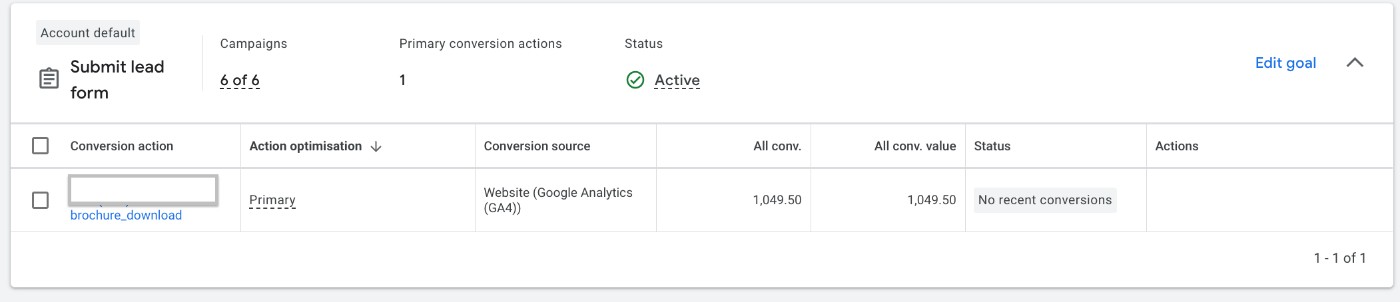
Read the names of each conversion action. Ask yourself: is this a real enquiry?
Good ones look like: calls from ads, calls from website, contact form submitted, quote request.
Watch out for things like page views, time on site or “clicked the contact page”. Those aren’t enquiries. They make your numbers look better than they are.
Look at the screenshot above. A brochure download is being counted as a lead. Is someone downloading a brochure really asking you for a quote?
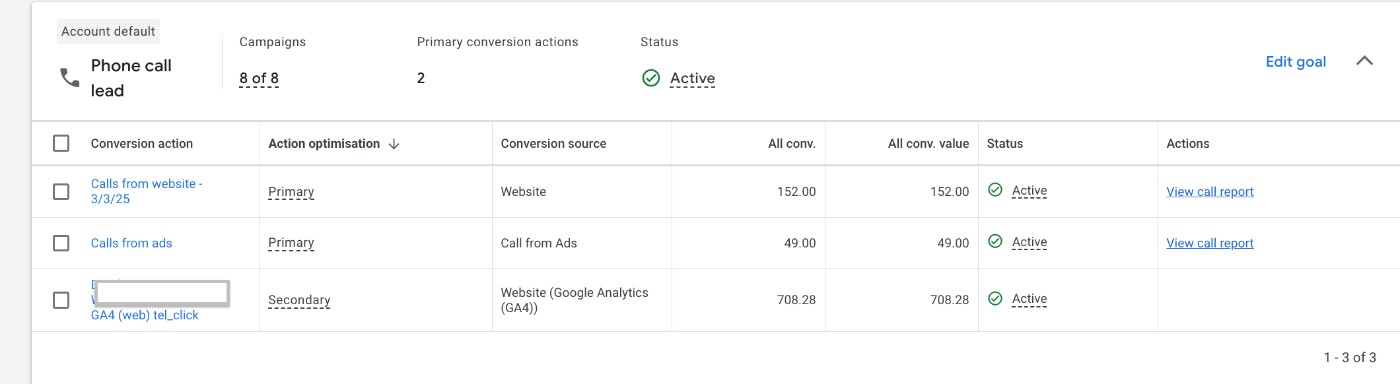
Step 4: Check calls are in there
Most homeowners still pick up the phone. If calls aren’t tracked, you’re missing a big chunk of your results.
Look for two things. Calls straight from the ad (when someone taps your number in the ad). And calls from your website (when someone clicks through, then rings the number on your site). The second one needs a Google forwarding number on your website to work.
Step 5: Check which ones are Primary
Next to each action, Google shows whether it’s Primary or Secondary. Only Primary actions are used to decide your bids.
Your real enquiries should be Primary. Anything that isn’t a real enquiry shouldn’t be.
You can see this in the calls screenshot above. Calls from the website and calls from ads are Primary. A click on the phone number, which isn’t a confirmed call, is Secondary. That’s how it should look.
Step 6: Count the last 30 days
Look at how many conversions you’ve had in the last 30 days. If you’re running Performance Max and it’s under 15, read the section above again.
Step 7: Sense-check it against your phone
This is the most important step, and it’s not in Google at all.
How many enquiries did you actually get last month from Google? Check your phone, your inbox, your notebook.
If Google says 40 and you remember 8, something is double counting. If Google says 2 and you had 15, something is missing. The two numbers won’t match perfectly, but they should be in the same ballpark.
Step 8: Check your Meta pixel while you’re at it
If you also run Facebook or Instagram ads, the pixel is Meta’s version of tracking. In Meta Business Suite, go to Events Manager and check your pixel is showing recent activity. If it’s empty or says no activity, Meta is flying blind too.
Three questions to ask whoever runs your ads
If someone else looks after your Google Ads, you shouldn’t have to do the above yourself. But you should be able to ask these and get a straight answer.
“How many enquiries did Google Ads bring in last month, and what did each one cost?”
If the answer is clicks, impressions or “reach”, that’s not an answer.
“Are phone calls being tracked, from the ad and from the website?”
For most trades, calls are the majority of enquiries. If they’re not counted, the report is wrong.
“If we’re on Performance Max, are we getting 15 conversions a month? If not, why are we on it?”
Google’s own help page backs you up on this one.
If you’d like a bit more on what good reporting looks like, I covered it in why your Google Ads leads might be costing more. And if you’re not sure who owns your account in the first place, start with who actually owns your Google Ads account.
The bottom line
Running Google Ads without tracking is like sending a van out with no job sheet and never asking what it did all day.
It might have been busy. It might have been parked up. You’d never know.
That paving company didn’t do anything daft. They did what lots of busy trade owners do. They switched the ads on and got back to work. The fix isn’t complicated. It just needs doing before the money goes out, not after.
I don’t report on clicks. I report on enquiries, what they cost, and what my clients have actually sold from them. That’s the only way I know whether the ads are earning their keep.
I have availability for new Google Ads management clients. If you’d like me to look at your account and tell you what’s being tracked and what isn’t, book a quick call.